Your local
3D printing
catalog.
Organize your 3MF, STL and STEP files and your filament in one place: with a 3D viewer, automatic hashtags and one click into your slicer.
No account, no cloud · MIT License

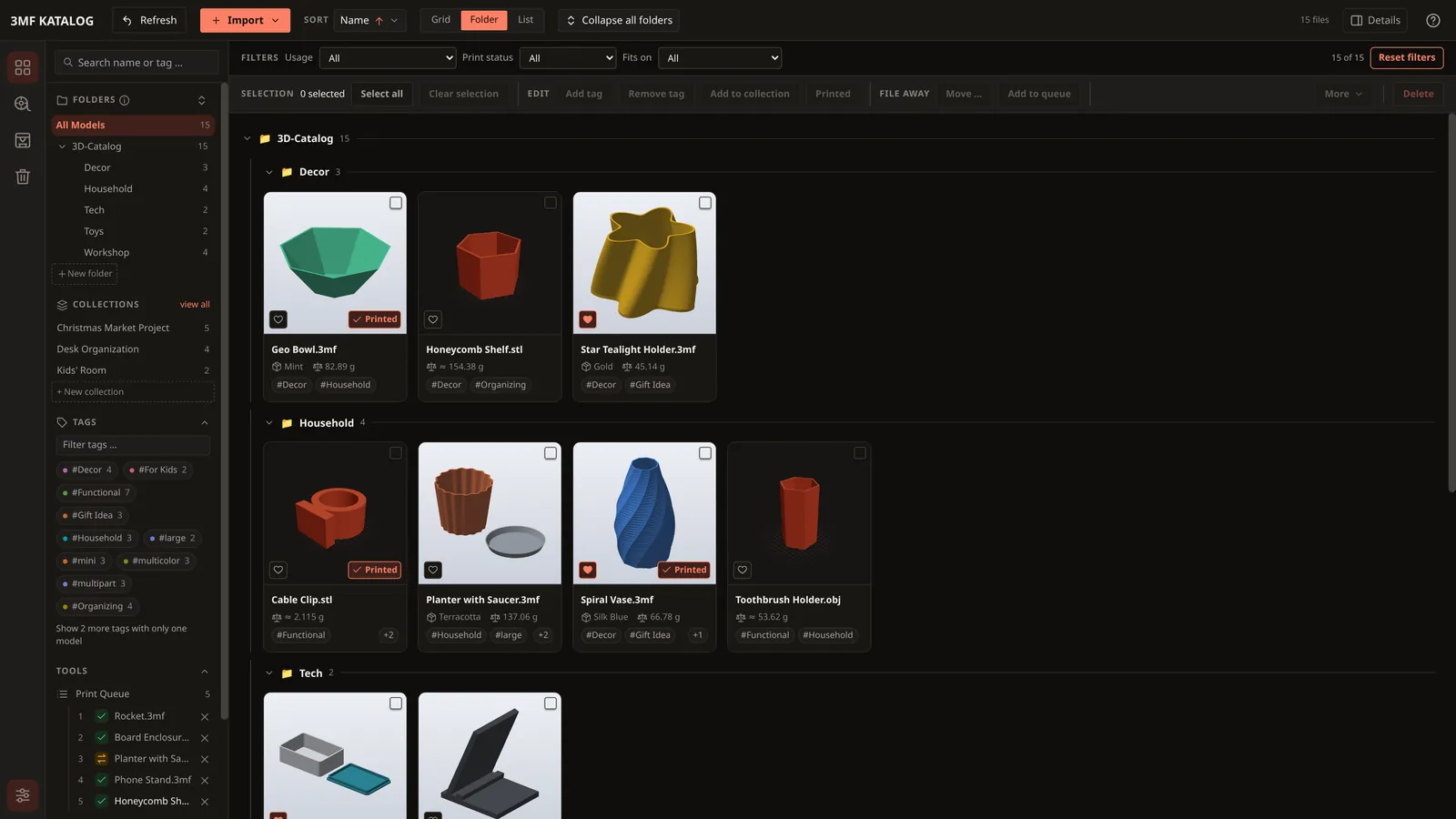
Find, don't search.
Type something or click a hashtag. That's how fast you find the right model in your catalog, even among thousands.
Everything your
model folder never could.
Drag in a folder, done.
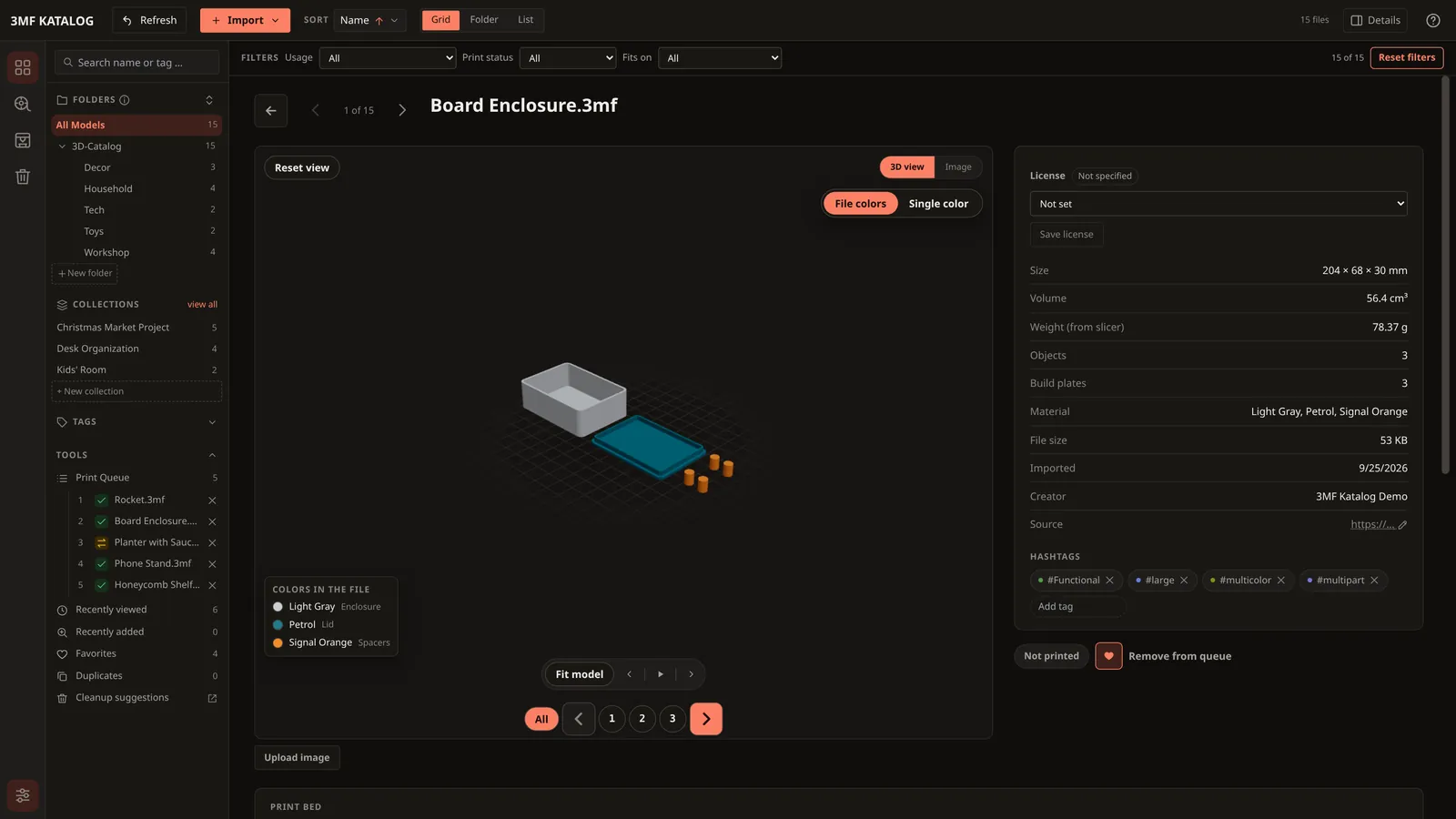
The catalog reads every 3MF and STL file, creates preview images and sorts everything for you.
- Automatic metadata: dimensions, volume, material and build plates, read straight from the file
- Hashtags on their own from file name, geometry and slicer profile, editable at any time
- Live 3D preview to rotate and zoom, for STL, OBJ and STEP too
- Extract archives directly: drag in ZIP, 7z, RAR or TAR, without overwriting anything
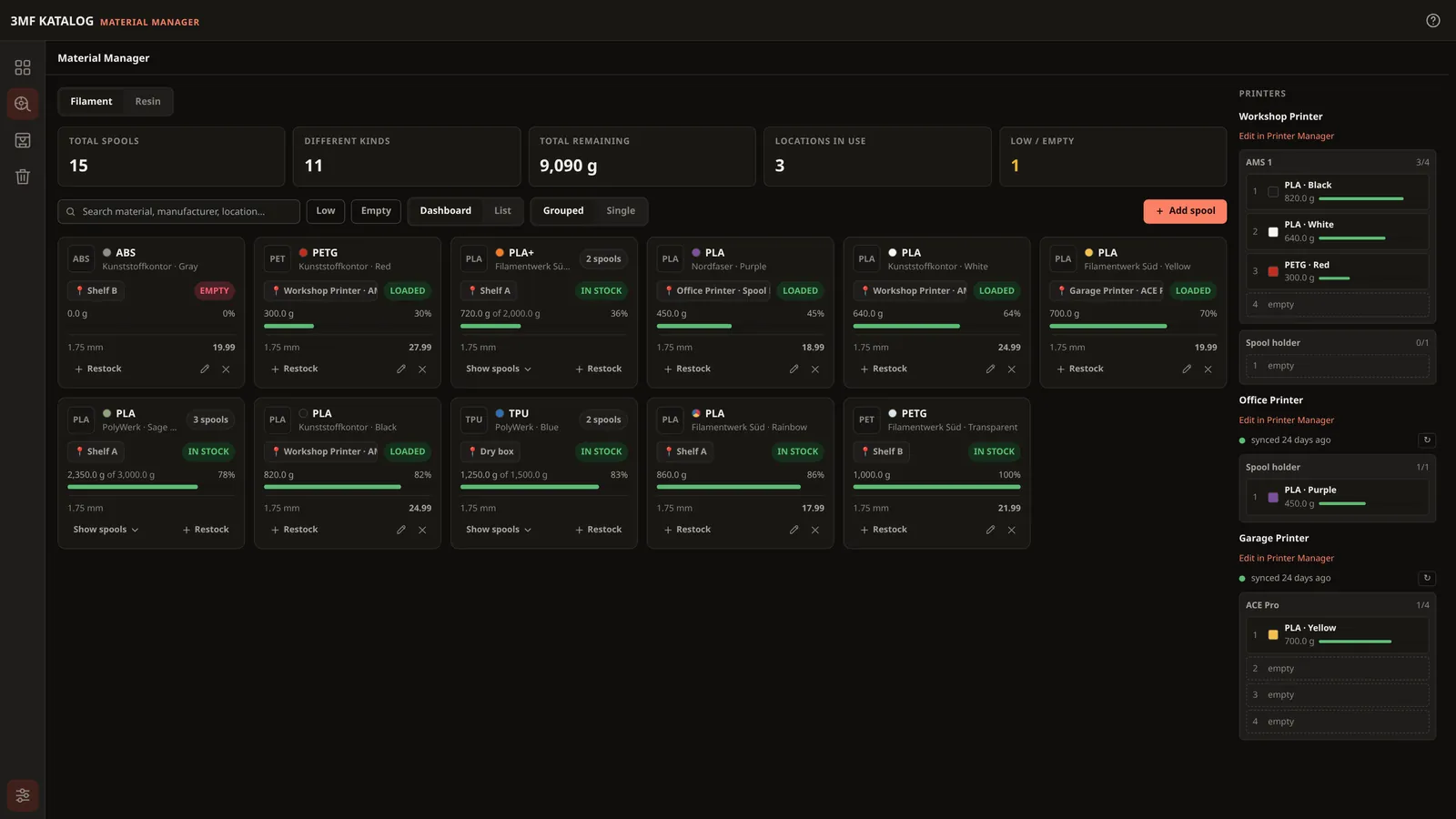
Do you know how much PETG is left?
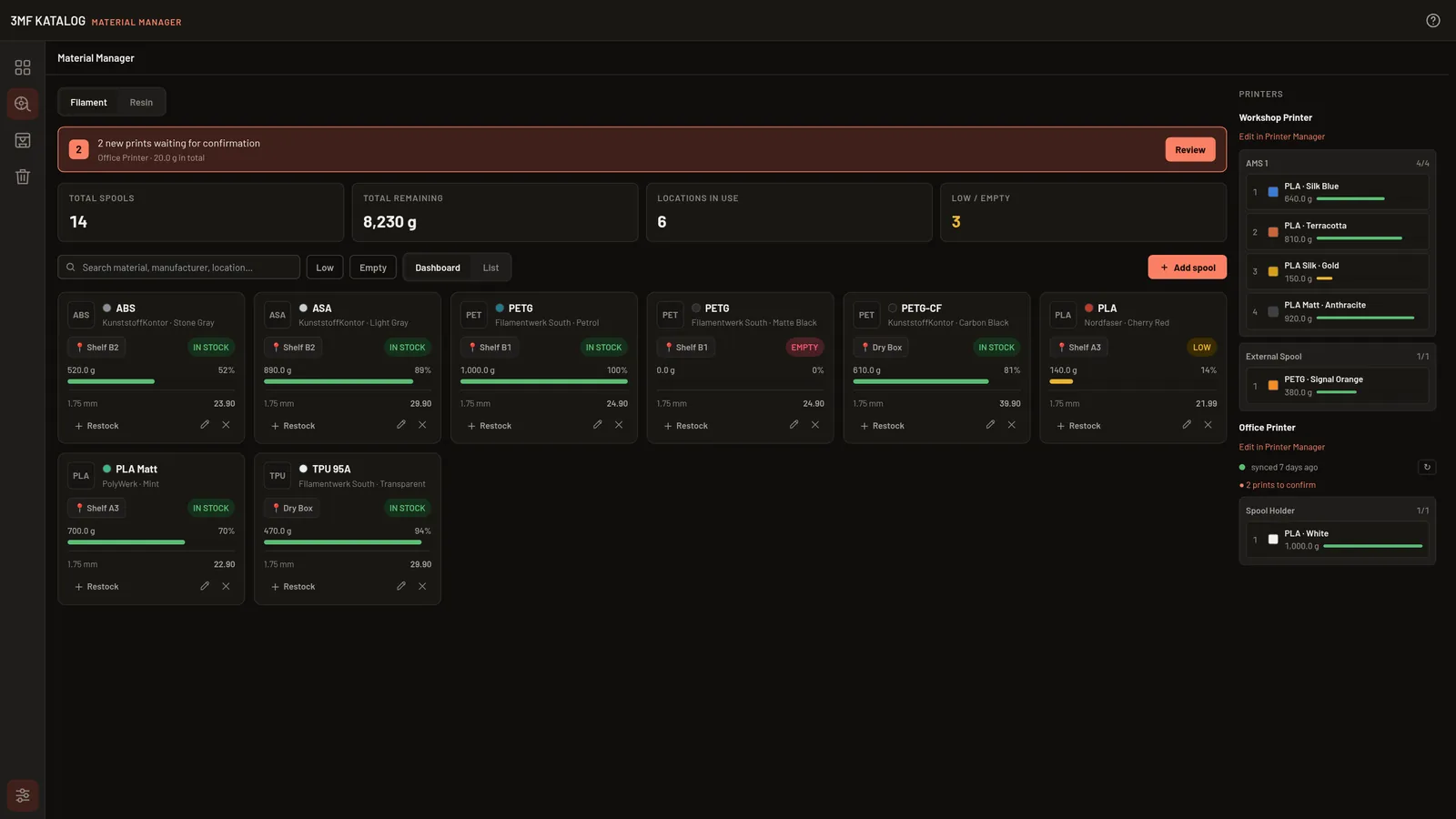
The Material Manager keeps track of your spools and resin bottles and shows at a glance what's running low.
- Material, brand, color, storage location, remaining weight to 0.1 g and price
- Printers & AMS slots: load spools by drag & drop (Bambu AMS, AMS lite, AMS HT, Creality CFS, Prusa MMU3, Anycubic ACE Pro)
- Real usage from sliced 3MF files, per plate and filament, material costs calculated automatically from your spool prices
- Resin in ml in the same manager. Status colors show what needs restocking
One click into your slicer.
The app finds installed slicers automatically. You can add as many other slicers as you like, from any vendor.
- Printer connection: Klipper printers report their usage, you confirm, and the app deducts it from the spool. Read-only, home network only
- Print queue: what are you printing next? Queue up models and sort them by drag & drop
- Resin printers with a dedicated resin vat for the inserted bottle
Your files stay with you.
Free, no subscription and no ads. Your catalog and files stay on your computer, and the source code is open on GitHub.
- One-click updates: the app checks the signature and backs up your catalog first
- Report bugs, stay private: user name, paths and addresses in the log file are replaced, and it is attached only if you want to
- Trash (7 days), backup as a ZIP and duplicate detection on import
- 4 languages (DE, EN, ES, FR), light & dark, keyboard shortcuts for power users
Free, no subscription and no ads. Source code open (MIT License).
No account, no cloud. Everything stays on your computer.
Linux, Windows and macOS. Every new version is available to everyone right away.
Get the catalog.
Current version v0.17.2. STEP preview is always included.
Try the pre-release
Pre-release . For trying out, not for every catalog.
The pre-release upgrades your catalog to a newer format. Without a backup, you cannot return to the stable version. Export your catalog first (Settings → Catalog → Export catalog). When updating, the app also creates a backup automatically.
Linux
AppImage · x86_64Windows
MSI installer · x64macOS
DMG · Intel & Apple SiliconThe packages are not signed; Windows (SmartScreen) and macOS (Gatekeeper) show a warning on first launch. Here is how to handle it: Understanding launch warnings.
From 0.16.0: With “Receive pre-release versions” enabled in Settings, you automatically receive further pre-releases and later the final version.
Docker & NAS (experimental)
The Catalog Manager also runs as a container with a browser desktop, for example on a NAS or home server. Experimental and in maintenance mode: only bug and security fixes.
Checksums & all versions
The SHA256 checksums let you verify that your download is unchanged.
Installation & update note
When updating from an older version, 0.16.0 converts your catalog to a newer format; the app creates a backup automatically beforehand. An export (Settings → Catalog → Export catalog) does not hurt either.
What are STEP files? · Step-by-step installation · User guide (DE/EN)
Help us with your printer.
The catalog is set to deduct filament usage straight from the printer. For that we need real responses from as many printers as possible.
5–20 minutes, nothing is changed on the printer. For Klipper, OctoPrint, Prusa and Bambu Lab.
What's coming next.
Plans can change at any time, for example because of feedback from the community or urgent bug fixes. Your ideas are welcome on Discord in #feature-requests.
- v0.17.0 · released
Companion files & folder care
Companion files for models, really deleting folders, remembering source folders and checking them at startup, undoing moves, and colors from Bambu, Orca and MakerWorld files in the 3D preview.
- v0.18.0 · in progress
More from your files
More info from 3MF and G-code files (print time, nozzle, temperatures), filtering by print data, bundling models, print history with failure reasons and statistics, dragging files from the file manager onto folders or opening them with "Open with", cataloging G-code and resin files, minimizing to the system tray on close, Thingiverse search with your own key (experimental), and error messages in all languages. Plus an optional web version in the browser.
- Later
Integrations
The printer connection for OctoPrint, Bambu Lab and PrusaLink too, Spoolman, a resin printer connection and a notification when a print finishes.
Help out → - Later
Packages & more
Flatpak on Flathub, .deb, .rpm and AUR packages, using the catalog on several devices and optionally translating tags with a local AI.
Frequently asked questions.
Does the app cost anything?
No. The 3MF Katalog Manager is completely free and open source under the MIT License. There's no subscription and no ads.
Are my files moved or uploaded?
No. The catalog only remembers where your files are and stores its data locally on your computer. Nothing is uploaded to a cloud.
Why do Windows and macOS show a warning on first launch?
The installers aren't digitally signed, because the certificates for that cost a lot of money. So Windows shows a SmartScreen warning and macOS a Gatekeeper message. On Windows, click “More info” and then “Run anyway”. On macOS, right-click the app and choose “Open”. On macOS 15 or newer it works differently: System Settings → Privacy & Security → “Open Anyway”. If you want to be sure, verify the file with the SHA256 checksums.
Antivirus programs such as Avast or AVG sometimes block new, unsigned programs as a precaution, without an actual finding (messages like “IDP.Generic” or “FileRepMalware”). What helps: restore the file from the antivirus quarantine and add the installation folder (usually C:\Program Files\3MF Katalog Manager) as an exception. If you want to check first, upload the file to VirusTotal. We report such false alarms to the vendor.
Which slicers are supported?
Bambu Studio, OrcaSlicer, PrusaSlicer, SuperSlicer and UltiMaker Cura are detected automatically. You can add any other slicer yourself. The app reads the real filament usage from files sliced in Bambu Studio or OrcaSlicer.
Is there a Docker version?
Yes, experimental and in maintenance mode. The Catalog Manager then runs as a container with a desktop in your browser and a companion page where you can view, download, send to your slicer and upload models. It only receives bug and security fixes, no new features. The guide is in the wiki. The desktop app remains the main version. To the guide
The app doesn't find any updates. What can I do?
At startup the app asks GitHub whether a new version is available. Some antivirus programs and firewalls, for example Kaspersky or TinyWall, block this request without telling you. In that case, allow 3MF Katalog Manager internet access in your security program. The app only downloads a small file with the current version number and doesn't send any personal data.
You can also download every new version from this page at any time and simply install it over the old one. Your catalog is kept.
My antivirus reports a trojan during the update. What can I do?
During an update the Windows installer replaces many program files and briefly backs up the old ones in C:\Windows\Installer\Config.Msi. Some antivirus programs, for example Kaspersky, wrongly see this pattern as malware (e.g. “PDM:Trojan.Win32.Generic”) and move files of the app to quarantine when “disinfecting”. The app then starts with a message like “TKBO.dll was not found”. This is a false alarm. To get the app back: add the installation folder (usually C:\Program Files\3MF Katalog Manager) as an exception in your antivirus and reinstall the current version. Your catalog is kept.
What are STEP files?
STEP files (.step/.stp) are design files from CAD programs such as Fusion 360, FreeCAD or Onshape. They describe the shape exactly and can be edited further. You don't need them for printing, that's what 3MF and STL are for. Some designers include STEP files so you can adapt the model.
The app displays STEP files with a 3D preview. There is one download per system, and STEP preview is always included.
An older installation of the standard variant automatically switches to the variant with STEP preview on the next update. Your catalog is kept.
How is the catalog different from Manyfold, Printventory & co.?
Many programs for 3D printing libraries are server applications: Manyfold, PrintStash or GyroidVault, for example, run via Docker on a server or NAS and are used in the browser. That's handy when several devices or people need to access the same collection.
The 3MF Katalog Manager, on the other hand, is a desktop app: install it, drag in a folder, done. There is also an experimental Docker version for NAS and home servers. On top of that there's the 3D preview for STEP files, a filament and resin storage with the slots of your printers, and the Klipper printer connection that deducts usage after you confirm.
Other desktop programs such as Printventory or Orynt3D have their strengths too, like AI tags or a very flexible search. Which program fits depends on what you need. Feel free to try several.
As of September 2026. The other programs keep evolving; their own pages are authoritative.
I have a problem or an idea. Where should I go?
The quickest way is on Discord in #help-installation, #bug-reports or #feature-requests. You can also report bugs directly on GitHub.
Where do I report a bug?
On Discord, on GitHub or without an account via the bug report form, anonymously if you like.
Detailed guides for every feature are in the wiki.
Join us on Discord.
Get help here, be the first to hear about new versions and have a say in what gets built next.
- 🛠️Help with installation and problems, for Linux, Windows and macOS
- 💡Submit feature requests and vote with a thumbs-up
- 🧪Try new versions early as a beta tester
- 📣Automatic announcement of every new version, here and on Bluesky

Bring order to your models.
Download for free, drag in a folder, done.